XX555 Gameplay Pakistan 2026 | Easy Login Guide
Today
7.15 MB
v1.1.50
Android 5.0+

Description
Finding a new mobile gaming platform can feel confusing when there are multiple apps, registration steps, and account settings to understand. Many users in Pakistan search for a simple guide that explains how the platform works without unnecessary technical details. If you are looking for information about XX555 gameplay, account setup, and login procedures, this guide covers everything in one place.
In this article, you’ll learn about the XX555 login process, account registration, dashboard features, payment options, and practical tips for getting started. Whether you are a first-time visitor or returning user, this XX555 complete guide 2026 is designed to help you navigate the platform more easily.
What Is XX555.com?
XX555.com is a mobile-friendly platform that allows users to create accounts, access their personal dashboard, and explore various in-app features through a smartphone or tablet. Many users access the platform through the XX555 mobile app, while others prefer using a mobile browser.

The platform is designed with a straightforward interface that helps users move between account settings, wallet options, promotional sections, and gameplay areas. Thanks to regular updates, the XX555 latest version 2026 offers an improved user experience and smoother navigation compared to earlier releases. If you’re interested in similar platforms, you can also read our complete [S98Win Game Guide] and [UK777 Game Pakistan Guide].
For users in Pakistan, the platform is commonly accessed through mobile devices, making convenience and usability important parts of the overall experience.
Getting Started with XX555
Before exploring different sections of the platform, it helps to understand the basic setup process. Most users begin by downloading the application, creating an account, and completing verification.
The XX555 Gameplay app setup process is generally simple and can be completed within a few minutes. New users should ensure they have:
- A valid mobile number
- Stable internet access
- A compatible Android device
- Access to verification messages
After these requirements are ready, users can proceed with the XX555 APK download and account creation process.
XX555 Gameplay APK Download and Installation
Many users search for the latest application version before registering an account. Downloading the XX555 latest version 2026 ensures access to newer features and performance improvements.
When installing the application:
- Download the latest APK file.
- Enable installation permissions if required.
- Complete the installation process.
- Open the application.
- Proceed to registration.
Always verify that you are downloading the correct application version and avoid installing files from unknown sources.
How to Create an Account?
Creating an account in xx555 gameplay is one of the first steps for accessing platform features. The XX555 registration guide is relatively straightforward, making it suitable for both new and experienced users.
Step 1: Open Registration Page
Launch the application and locate the registration or sign-up section.
Step 2: Enter Mobile Number
Provide an active phone number that can receive verification messages.
Step 3: Create Login Credentials
Choose a secure password that combines letters and numbers.
Step 4: Complete OTP Verification
The XX555 OTP verification process helps confirm account ownership. Enter the verification code sent to your mobile device.
Step 5: Submit Registration
After verifying the information, submit your details and wait for account activation.
Once completed, your XX555 gameplay account registration will be ready for use.
Complete Login Guide
After registration, users can access the platform using the XX555 Gameplay account login page.
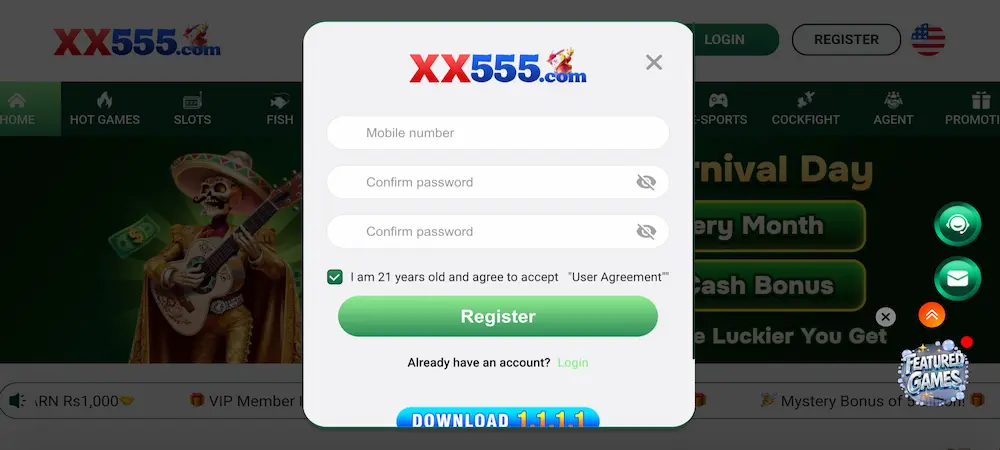
The XX555 secure login method typically involves entering your registered mobile number and password.
How to Log In?
- Open the app or website.
- Select the login option.
- Enter your mobile number.
- Input your password.
- Tap the login button.
Successful authentication will grant access to the user dashboard.
The XX555 mobile number login system is designed to simplify account access while maintaining basic account security.
Exploring the Dashboard
Once logged in, users are directed to the XX555 user dashboard.
This area acts as the central control panel for account activities. Understanding dashboard navigation can significantly improve the overall user experience.
Within the dashboard, users may find:
- Profile settings
- Wallet management tools
- Transaction history
- Notification center
- Promotional offers
- Activity records
The XX555 dashboard access section allows users to monitor account information and manage various platform functions from one place.
For beginners, spending a few minutes exploring the dashboard can make future navigation much easier.
Understanding the Gameplay Interface
One of the most common questions among new users is how to use XX555 efficiently.
The XX555 gameplay overview begins with understanding the platform layout. The interface is organized into clearly labeled sections that help users locate important functions quickly.
The XX555 game interface is generally designed with mobile users in mind, offering responsive menus and easy navigation.
Some common interface areas include:
- Home screen
- Activity center
- Wallet section
- User profile
- Rewards section
- Support options
Learning the basics of XX555 game navigation can improve efficiency and reduce confusion during regular use.
Key Features of XX555
The platform includes several features intended to improve convenience and engagement.
User-Friendly Design
A clean layout helps users locate important sections without navigating through multiple menus.
Mobile Compatibility
The XX555 mobile app is optimized for smartphone usage, making it convenient for users who prefer mobile access.
Daily Rewards
Many users explore the XX555 daily rewards section to view available promotions and platform activities.
Bonus System
The XX555 bonus system often highlights promotional campaigns and user incentives. Users should carefully review terms and conditions before participating in any activity.
Account Management
Profile updates, password changes, and verification options are typically accessible through the dashboard.
Smooth Navigation
The platform focuses on simple navigation, allowing users to move between sections efficiently.
These features contribute to a more streamlined XX555 user experience.
Wallet Setup and Payment Options
Managing account funds is another area that attracts user attention.
The XX555 wallet setup process generally begins inside the account dashboard.
Users may find options related to:
- Account balance monitoring
- Transaction records
- Payment management
- Withdrawal requests
Understanding the XX555 payment system can help users manage transactions more effectively.
Deposit Methods
Many Pakistani users prefer local payment solutions. Depending on availability, users may encounter options associated with:
- XX555 EasyPaisa support
- XX555 JazzCash support
- Other supported payment channels

Before completing any transaction, users should verify payment details carefully.
Withdrawal Process
The XX555 withdrawal process usually requires account verification and accurate payment information.
Basic steps often include:
- Access wallet settings.
- Select withdrawal.
- Enter requested information.
- Confirm transaction details.
- Submit the request.
Users should review applicable processing times and platform requirements before initiating requests.
Gameplay Tips for Beginners
Starting with a structured approach can improve the overall experience.
Here are some useful XX555 gameplay tips:
Learn the Interface First
Spend time understanding dashboard functions before exploring advanced features.
Keep Login Details Secure
Protect account credentials and avoid sharing passwords.
Monitor Notifications
Platform updates and announcements are often communicated through dashboard notifications.
Review Account Activity
Checking account history regularly helps users stay informed about recent actions.
Stay Updated
Installing the latest application version helps maintain compatibility and performance.
These simple habits can improve overall platform usage and reduce common mistakes.
Common Login Problems and Solutions
Even well-designed platforms can occasionally present login challenges.
Here are some common XX555 login problems and practical solutions.
Incorrect Password
Double-check capitalization and typing errors before attempting another login.
OTP Not Received
Wait a few moments and verify that your mobile network is active.
Account Access Issues
Confirm that the correct registered phone number is being used.
Forgotten Password
Use the XX555 Gameplay password recovery option available on the login screen.
Temporary Technical Errors
Updating the application or restarting the device may resolve certain issues.
Understanding these troubleshooting steps can make the XX555 login issues fix process much easier.
Safety Tips for New Users
Account security should always remain a priority.
Consider these practical recommendations:
- Create a strong password.
- Avoid sharing verification codes.
- Keep your application updated.
- Verify payment details carefully.
- Log out from shared devices.
- Enable available security features.
Following a basic XX555 safe usage guide can help protect account information and improve overall security.
Why Users Prefer Mobile Access?
Mobile access continues to grow because it offers flexibility and convenience.
The XX555 mobile gaming platform allows users to manage accounts, review transactions, and access dashboard features directly from their phones.
Since many users spend more time on smartphones than desktop devices, mobile optimization plays an important role in the overall platform experience.
The combination of account accessibility, streamlined navigation, and responsive design makes mobile access a popular choice among users.
Final Thoughts
XX555 Gameplay continues to attract attention from users looking for a straightforward mobile platform experience. From account creation and OTP verification to dashboard navigation and payment management, understanding the basics can make the platform easier to use.
This XX555 gameplay review Pakistan guide covered the essential areas that most new users want to learn about, including registration, login, wallet setup, gameplay navigation, and account management. By following the steps outlined above and maintaining good security practices, users can navigate the platform with greater confidence.
Whether you’re exploring the XX555 app download and login process for the first time or looking to improve your understanding of dashboard features, staying informed and using the latest version of the application can help create a smoother overall experience.
Looking for more gaming guides? Explore our detailed articles on [RS778 Game Pakistan], and [JJ55 Game APK Safe Guide 2026].
FAQs
Does XX555 Gameplay offer a mobile app for Android users?
Yes, XX555 can be accessed through its Android application. Users should always download the latest available version to benefit from improved performance, updated features, and a smoother overall experience.
How can I update the XX555 Gameplay app to the latest version?
To update the app, download the newest version from the platform’s official source and install it on your device. Updating regularly helps maintain compatibility and provides access to the latest features and improvements.
Can I use the same XX555 Gameplay account on multiple devices?
In many cases, users can access the same account on different devices using their registered login credentials. For account security, always log out from shared devices and keep your password private.
Where can I find promotions and special offers on XX555?
Promotions, rewards, and limited-time activities are usually displayed within the app’s activity center or dashboard section. Users can check these areas regularly to stay informed about available offers and updates.